How projects work
Every idea becomes its own app, with its own chat, preview, versions and web address. You can have as many as you like.
Where your apps live
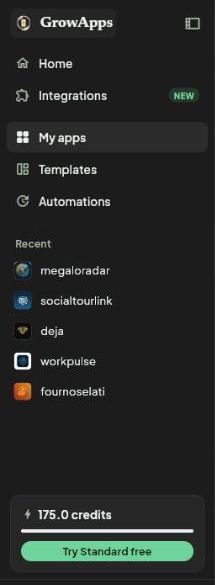
Your newest apps are under Recent apps on the home screen. All of them are in My apps in the left menu, where you can open, rename or delete them.
Inside an app
- The chat, on the left. Everything you asked for and everything GrowApps did, in order.
- Preview, on the right. Your app running live. Only you and your collaborators see it.
- Browser. Watch GrowApps open and test your app like a visitor would.
- App assets. Your logo, pictures and the files of your app, including the full source code to download.
- Export. Publish to the web, Google Play and the App Store, preview on your phone and invite people.
Versions and going back
Every change is saved as a version. Use the history button above the chat to go back, or just say "undo the last change".
Sleeping apps
An app you have not opened for a while goes to sleep. Open it and it wakes up, usually within a few minutes. Your published website stays online.
Start from someone else's app
Open any app in Templates and remix it: you get your own copy to change. You can also share your own app as a template and earn credits when people remix it.
Screenshots taken from growapps.ai in October 2026. Something missing or out of date? Write to us from the contact page.