Google Play and the App Store
Your app can be a real phone app too. GrowApps prepares everything; the store accounts are yours.
Google Play (Android)
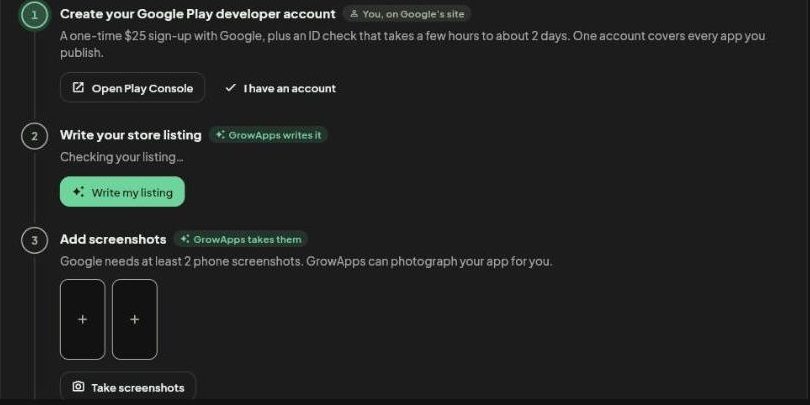
Press Export, then Google Play. This is part of the Standard plan. The page lists 6 steps. GrowApps does the ones marked with a sparkle; the rest happen on Google's site.
-
Create your Google Play developer account
A one time 25 dollar sign-up with Google, plus an ID check that takes a few hours to about 2 days. One account covers every app you publish. Press Open Play Console, or I have an account if you already do.
-
Let GrowApps write your store listing
Press Write my listing. GrowApps writes the name, the description and the rest.
-
Let GrowApps take the screenshots
Google needs at least 2 phone screenshots. Press Take screenshots and GrowApps photographs your app for you.
-
Let GrowApps write your privacy policy
Google asks every app for a privacy policy and data safety answers. Press Write my policy.
-
Build the signed app file
GrowApps builds the signed file Google asks for (an .aab file). Press Download .aab.
-
Upload it in Google Play Console
Go to play.google.com/console, create your app, upload the file, paste the listing and add the screenshots GrowApps made. Then send it for review.
Easier: let GrowApps do it. Say in the chat "publish my app on Google Play". GrowApps opens Play Console in its own browser, you sign in once, and it fills in the rest while you watch.
Just want to test on an Android phone? Use Download app to install it directly.
App Store (iPhone)
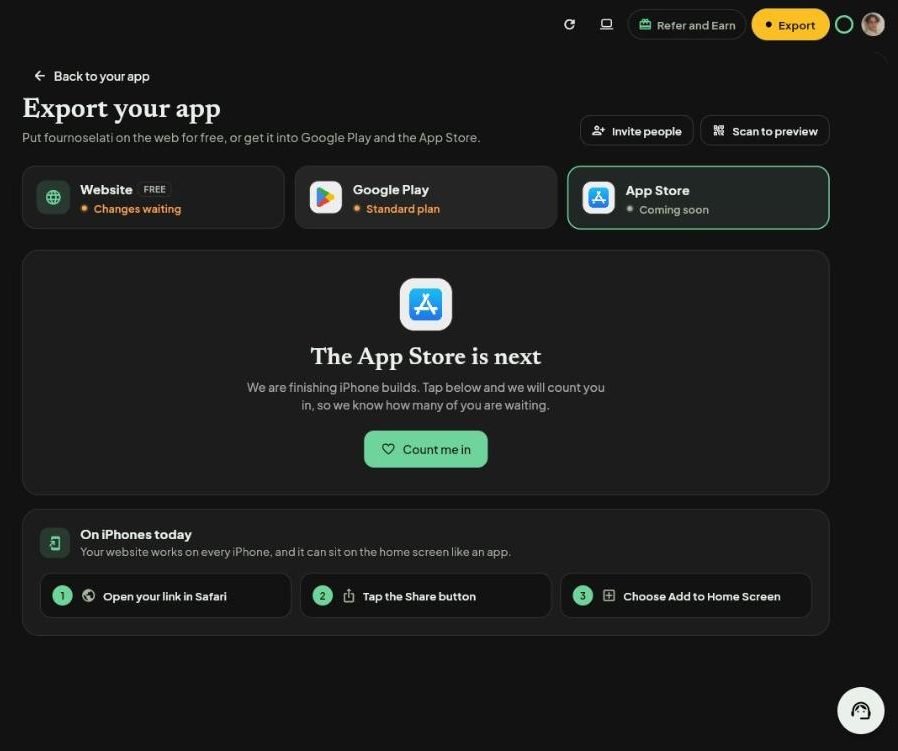
Publishing to the App Store from GrowApps is next. On the App Store page press Count me in so we know you are waiting.
Today your website already works on every iPhone and can sit on the home screen like an app: open your link in Safari, tap the Share button, and choose Add to Home Screen.
Screenshots taken from growapps.ai in October 2026. Something missing or out of date? Write to us from the contact page.