Build your first app
By the end you will have a working app you can open on your phone and a link you can share.
- About 30 minutes
- 7 steps
- No code
You will need
- A Google account or an email address to sign in
- One or two sentences about your idea: who uses it and what they do in it
-
Describe your idea
Go to growapps.ai. Type your idea in the big box and press Grow. Not sure what to write? Start from one of the ready ideas under the box and change it to fit yours.
Try this
A booking app for my yoga studio. Clients sign in, pick a class and book a spot. I see who is coming each day.
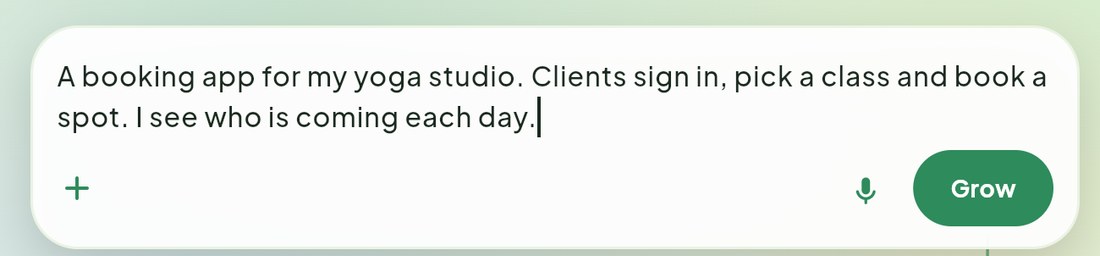
Say who will use the app and what they do in it. One or two sentences is enough. New here? The same box is on the front page. GrowApps keeps your idea while you sign in, then picks it up.
-
Answer a few quick questions
GrowApps asks short questions in cards titled Quick question. Each has a Recommended answer. Pick one and press Send answer, or choose Answer in the chat instead to write your own. Meanwhile it researches apps like yours, so the first version already has the parts people expect.
-
Approve the design
When the screens are drawn you see Your screens are ready. Look through them. Want a change? Say it in the chat, for example "make it green and add a prices page". When you like it, press Approve and build.
-
Pick how to pay for the build
Building uses credits. You will see Pick a plan to start building. Choose Start free trial (Standard, 7 days free with a card; cancel before day 7 and pay nothing) or Continue with my credits if you already have some. See Credits and plans.
-
Watch it build
The top of the screen says Building your app.... This takes several minutes, and you can do something else meanwhile. When it says Your app is ready, open it, your app appears on the right side of the screen.

The top bar. Left: your app and the Preview tab. Middle: what GrowApps is doing right now. Right: Export, where you publish. -
Try it and change anything
Click around your app on the right, like a real user would. To change something, type it in the chat box at the bottom left and press the arrow. Talk normally: "the booking button is too small", "add a page with our opening hours".
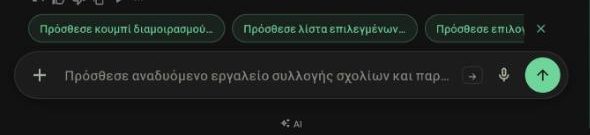
The chat box. Plus adds photos or screenshots; the microphone lets you speak instead of typing. To see it on your phone, press Export, then Scan to preview, and point your phone camera at the code. More in Test on your phone.
-
Put it online
Press the yellow Export button, choose Website, then Publish to the web. In about a minute your app has its own address. Press Copy link and send it to anyone.
You're done when
Your app is live at an address like yourapp.growapps.cloud, and the page shows Live.
Nothing you do can break it for good. Every change is saved as a version. If you do not like a change, tell the chat "undo the last change" or use the history button above the chat to go back.
Screenshots taken from growapps.ai in October 2026. Something missing or out of date? Write to us from the contact page.